The Growing Threat: Cyberattacks on Small and Medium-Sized Businesses

Small and medium-sized businesses (SMBs) are increasingly in the crosshairs of cybercriminals. The numbers paint a stark picture:

  • 43% of all cyberattacks target small businesses.[1]
  • Nearly three-quarters (73%) of US small business owners reported a cyberattack in recent years. [2]
  • The average data breach cost for businesses with less than 500 employees is $2.98 million.[3]
  • Phishing attacks remain the top attack vector, responsible for over 36% of breaches in 2023. 3

The data makes it clear that SMBs are no longer flying under the radar. In fact, they have become prime targets for cyberattacks due to their combination of perceived vulnerabilities and valuable data.

Why Are SMBs Attractive Targets?

  • Perceived Lack of Security: Many SMBs believe that their size shields them from attacks. This false sense of security often leads to inadequate defenses, making them easy targets.
  • Limited Resources: Unlike large enterprises, SMBs typically have limited budgets for cybersecurity, resulting in weaker protection and slower incident response.
  • Valuable Data: Despite their size, SMBs handle a significant amount of sensitive data, including customer information, payment details, and intellectual property—making them a goldmine for attackers.
  • Supply Chain Attacks: SMBs often serve as links in larger supply chains. Cybercriminals may target SMBs to gain access to bigger organizations, leveraging their connections to infiltrate other networks.

The Consequences of a Cyberattack

  • Financial Loss: The average data breach cost for businesses with less than 500 employees is $2.98 million. 3 This includes not just the direct costs of the attack, but also the expenses associated with recovery, legal fees, and potential fines.
  • Reputational Damage: A breach can affect customer trust, leading to a loss of business.
  • Operational Disruption: Nearly 60% of businesses that suffer a cyberattack close their doors within six months.[4] The disruption caused by an attack can bring operations to a standstill, making recovery difficult, if not impossible.
  • Legal and Regulatory Consequences: Businesses are increasingly held accountable for breaches, facing penalties for failing to protect customer data.


The Imperative for Proactive Cybersecurity in 2024 and Beyond

Today, SMBs cannot afford to be complacent. Proactive cybersecurity measures are essential to protect your business from the growing risk of cyberattacks. Here’s how your business can protect itself:

  • Develop a Comprehensive Cybersecurity Strategy: A tailored cybersecurity plan should address the unique risks your business faces and outline clear steps for prevention and response.
  • Prioritize Employee Education and Awareness: Human error is a leading cause of breaches. Regular training can empower your employees to recognize and avoid common threats, such as phishing. Investing in a training framework ensures that your employees stay vigilant and prepared as new cyber threats emerge.
  • Implement Multi-Layered Security Measures: Depth in defense is key. Utilize firewalls, antivirus software, encryption, and intrusion detection systems to create multiple barriers against attackers. A security framework should comprehensively protect your organization— covering the perimeter of your networks, the core of your data center & cloud infrastructure, and extend to each individual employee.
  • Regularly Back Up Data: Regular, secure backups ensure that your business can recover quickly from a ransomware attack or data breach without paying a ransom.
  • Consider Cyber Insurance: Cyber insurance can provide a safety net, covering some of the costs associated with a breach, including recovery and legal fees.
  • Partner with a Managed Service Provider (MSP): An MSP, like IT Solutions, provides the expertise and resources your business needs to maintain robust cybersecurity, often at a fraction of the cost of in-house solutions.
  • Embrace Cloud Security Solutions: Cloud-based security services offer scalable, up-todate protection that adapts to evolving threats.
  • Stay Informed and Adapt: The cybersecurity landscape is constantly changing. Regularly review and update your security practices to stay ahead of new threats.

Act Now to Protect Your Business

The threat of cyberattacks to small and medium-sized businesses is real and growing. The statistics are clear: SMBs are increasingly targeted by cybercriminals, and the consequences of a successful attack can be devastating.

A cyberattack is no longer a question of “if,” but “when” one will occur. Proactive cybersecurity is not just an option but a necessity for the survival and success of your business. By implementing comprehensive security measures, educating your employees, and partnering with trusted cybersecurity experts, you can significantly reduce your risk and ensure your business remains resilient in the face of evolving threats.


[1] U.S. Small Business Administration (SBA)

[2] Identity Theft Resource Center (ITRC)

[3] IBM

[4] Inc.com


Empowering Businesses with Integrated Cybersecurity

Introduction: The Changing Cybersecurity Landscape

Leading a company these days feels like stepping into a world of amazing chances and substantial hurdles. Every leader hopes to see their dream become real, but the online world also has dangers that can disrupt even the best plans. That’s why a strong, all-inone cybersecurity solution is so crucial. It’s not just an idea, but a real asset that lets you grow your business without worrying about sophisticated threat actors.

Picture your company as a modern-day castle. Your precious ideas, sensitive customer information, and reputation are like valuable treasures locked inside. But just like any fortress, you need robust defenses.

In today’s digital world, those defenses come as innovative technology and cybersecurity expertise that work together without a hitch. This concept forms the basis of an all-in-one managed cybersecurity solution that combines three key parts: Managed Extended Detection and Response (MXDR), Managed Security Information and Event Management (SIEM), and a Managed Security Operations Center (SOC).

What Do These Security Terms Actually Mean?

Let’s explain these in a way that makes sense without all the tech talk.


  1. Managed Extended Detection and Response (MXDR): Picture MXDR as the cutting-edge alarm system for your stronghold. It keeps a watchful eye on all the entry points of your digital space—from your computer systems to cloud services and even mobile apps. MXDR uses advanced algorithms and machine learning to identify anything out of the ordinary.


Studies indicate that businesses with sophisticated threat detection tools can spot breaches up to 80% quicker than those using old-school methods. Since each minute of a breach could set you back about $17k, quick detection isn’t just a nice-to-have… it’s crucial.

  1. Managed Security Information and Event Management (SIEM): Think of MXDR as your sensor network and Security Information and Event Management (SIEM) as your control hub. Picture a space where all the warnings and records from your sensors come together. SIEM gathers and sorts data from every corner of your IT environment—servers, networks, cloud apps—and then searches for signs that might point to an issue. It’s like having a vigilant guard who understands what “regular” looks like and raises the alarm when something appears unusual.
  2. Managed Security Operations Center (SOC): Lastly, the SOC brings in human expertise. Even with leading technology, having skilled people keep an eye on your defenses 24/7 makes a dramatic difference. SOC experts work around the clock to manage any alerts from MXDR and SIEM. They’re on hand to examine, limit, and deal with threats before they can do serious harm. With cyberattacks going up—a recent jump of over 300% since COVID-19 hit—a dedicated team proves priceless.


Component Analogy Function
Managed Extended

Detection & Response

(MXDR)

Security cameras & motion sensors Monitors all entry points (workstations, cloud, email, etc.) for threats in real-time.
Security Information &

Event Management (SIEM)

Security control center Collects & analyzes security data from multiple sources to detect suspicious activity.
Security Operations Center (SOC) 24/7 security monitoring team Your dedicated cybersecurity team that investigates alerts and takes action.


How Do These Pieces Fit Together?

Picture this: you’re at the helm of a startup, and your SIEM system spots some odd behavior — a warning sign. In no time, MXDR checks this alert using its strong analytics to verify if it’s a genuine threat. At the same time, your SOC team gets notified and springs into action to cut off the threat and lock down your network. This quick team effort is what keeps your digital stronghold protected.

Here’s why old-school security isn’t enough anymore—think about these striking facts:

  • 43% of cyberattacks target small and midsize businesses, yet only 14% are prepared to defend themselves. (Small Business Administration)
  • The IBM Cost of a Data Breach Report reveals that a typical data breach in 2023 had a price tag of $3.31 million for businesses with under 500 employees.
  • Cyberattacks have skyrocketed, with research showing ransomware jumping by

150% and phishing scams climbing by 70%. (Reuters)

  • Each minute you save in spotting a breach can lead to exorbitant cost savings and less overall harm.

These numbers show why a swift, integrated response isn’t just clever—it’s essential.

Real-World Use Cases

MXDR, SIEM, and SOC work together to provide a layered security defense, ensuring threats are identified and stopped before they can cause harm. Here’s how this collaboration plays out in real-world scenarios:

  1. Preventing Ransomware Attacks: A financial firm using MXDR detected an attempted ransomware attack. The system immediately isolated the affected endpoint, stopping the attack before any data was encrypted.
  2. Stopping Business Email Compromise (BEC): A law firm was targeted by a phishing attack aimed at stealing client funds. MXDR identified the fraudulent login attempt, blocked access, and alerted the SOC team to prevent financial loss.
  3. Enhancing Compliance & Security Audits: A healthcare provider leveraged MXDR with SIEM to simplify compliance audits and improve data protection. The system automatically logged and analyzed security events, ensuring regulatory requirements were effortlessly met.


Why IT Solutions is the Right Cybersecurity Partner

You might ask, “Who can set up and manage this high-tech security system?”

This is where IT Solutions steps in. With 30+ years as a leading Managed Service Provider (MSP) and absolute dedication to helping businesses grow, IT Solutions gives you more than just technology solutions—they become your strategic partner and cybersecurity guardian.

Here’s what sets them apart:

Strong Industry Knowledge

IT Solutions has earned its name by grasping the unique problems that organizations of all sizes and industries face. Their team is continually trained and works to create security solutions that fit your exact needs, so you don’t have to worry about it.

Cutting-Edge Technology

IT Solutions deploys the newest and best tools for MXDR, SIEM, and SOC. This gives you a security system that doesn’t just react but keeps learning and changing. Their technology platform investment helps reduce threat detection times by up to 80%, stopping threats before they become problems.

Putting Clients First

IT Solutions understands that you need to focus on growing your business—not get stuck with endless security worries. They provide ongoing strategic advisory consulting and regular updates on how things are going, so you always know where your security stands. Their team-up style means they care about your success as much as you do.

Complete Service Package

IT Solutions takes care of everything, so you can enjoy peace of mind. They lead with a consultative and thorough approach to security and then deploy MXDR, SIEM, and SOC to your current systems. They stick with you the whole way, ensuring your defenses stay strong as your company grows.

Final Thoughts

The online world holds exciting potential, but it also has dangers that can put your efforts at risk. A well-rounded cybersecurity strategy that combines MXDR, SIEM, and SOC gives you the all-encompassing protection you require. When it comes to providing this innovative service, IT Solutions stands out as the perfect partner. They blend deep expertise, state-of-the-art tech, and a real dedication to your success in an affordable package.

Penetration Testing: A Critical Safeguard for Today’s SMBs

In today’s rapidly evolving threat landscape, cybersecurity has become an indispensable concern for organizations of all sizes. Small and medium-sized businesses (SMBs) are increasingly attractive targets for cybercriminals due to their perceived vulnerabilities (and often less robust security infrastructure).


As cyberattacks grow more sophisticated and prevalent, proactive measures like penetration testing have emerged as a critical component of a comprehensive cybersecurity strategy. This white paper will delve into the importance of penetration testing, the benefits of penetration testing services, and the advantages of partnering with a Managed Service Provider (MSP) for vital security services tailored to SMBs.


The Growing Threat Landscape

The digital realm is witnessing a surge in cyber threats—ranging from ransomware and phishing attacks to sophisticated Advanced Persistent Threats (APTs). Cybercriminals constantly refine their tactics, exploiting vulnerabilities in systems, networks, and applications to gain unauthorized access to sensitive data.


Cybercriminals recognize that SMBs—often lacking the resources and expertise of larger enterprises—are particularly susceptible to these threats. A successful cyberattack can result in devastating consequences for an SMB, including:

  • Financial Loss: Data breaches can lead to significant financial losses due to downtime, recovery costs, legal fees, and potential fines.
  • Reputational Damage: A security incident can severely damage an organization’s reputation, eroding customer trust and impacting future business opportunities.
  • Operational Disruption: Cyberattacks can disrupt critical business operations, causing productivity losses and impacting service delivery.
  • Legal and Regulatory Consequences: Non-compliance with data protection regulations can result in legal action and hefty fines.

The Purpose and Importance of Penetration Testing

Penetration testing (also known as ethical hacking) is a proactive security assessment that simulates real-world cyberattacks to identify vulnerabilities in an organization’s IT infrastructure. Often delivered as a service, it involves a team of skilled security professionals attempting to exploit weaknesses in systems, networks, and applications to gain unauthorized access or compromise sensitive data.


By proactively identifying and addressing vulnerabilities, penetration testing enables organizations to strengthen their security posture and reduce the risk of a successful cyberattack.


Key Benefits of Penetration Testing

  • Vulnerability Identification: Penetration testing uncovers vulnerabilities that may not be detected by automated security tools, allowing organizations to prioritize remediation efforts.
  • Efficiency: Penetration testing services are inexpensive and can take less than 2 weeks from beginning to end.
  • Risk Assessment: By simulating real-world attacks, penetration testing provides a realistic assessment of the potential impact of a security breach.
  • Compliance: Penetration testing can help organizations demonstrate compliance with industry regulations and security standards.
  • Improved Security Awareness: Penetration testing highlights security risks to employees and management, fostering a culture of security awareness.
  • Peace of Mind: Knowing that systems have been rigorously assessed provides organizations with greater confidence in their security posture.

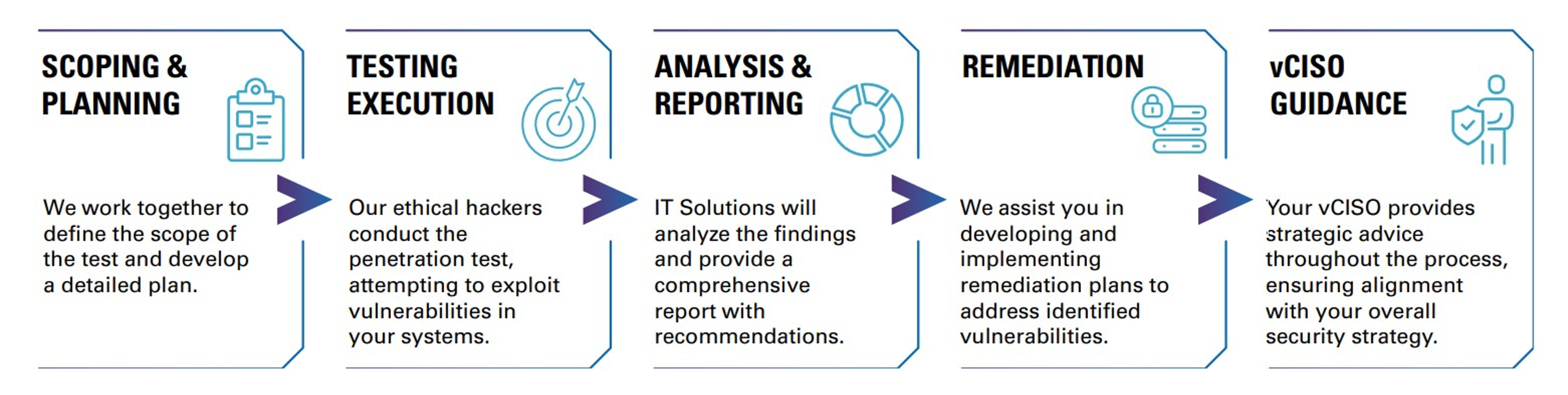
Penetration Testing Services – IT Solutions’ Process


Penetration Testing Service and vCISO Integration

It is important that a penetration (pen) testing service combines technical expertise with strategic guidance to help you effectively identify and address vulnerabilities. Here are some considerations to assess the efficacy and fit of a pen testing program:

  • Experienced Security Professionals: Is the pen testing team comprised of seasoned security experts with experience in vulnerability assessment?
  • Customized Testing: Will they tailor their testing methodologies to your specific business needs and requirements, ensuring a thorough assessment?
  • Comprehensive Reporting: Will they provide detailed reports that clearly outline identified vulnerabilities, potential impacts, and recommended remediation steps?
  • vCISO Integration: Does the provider offer a vCISO service that will provide ongoing strategic guidance and oversight to help you develop and implement a comprehensive cybersecurity program?


The Power of vCISO Integration

The integration of a Virtual Chief Information Security Officer (vCISO) with penetration testing services provides a significant advantage for SMBs.


A vCISO acts as a strategic advisor, guiding organizations on security best practices, risk management, and compliance. They work closely with the penetration testing team to ensure that identified vulnerabilities are addressed effectively and that the organization’s security posture is continuously improved.


Benefits of vCISO Integration:

  • Strategic Alignment: A vCISO ensures that security initiatives are aligned with the organization’s overall business goals and objectives.
  • Risk Management: A vCISO helps organizations identify, assess, and mitigate cybersecurity risks.
  • Compliance: A vCISO ensures that the organization adheres to relevant industry regulations and security standards.
  • Security Awareness: A vCISO promotes a culture of security awareness throughout the organization.
  • Cost-Effectiveness: A vCISO provides expert guidance without the cost of hiring a full-time executive.


The MSP Advantage for SMBs

Partnering with a Managed Service Provider (MSP) like IT Solutions for penetration testing and other security services offers several advantages for Small and mediumsized businesses (SMBs):

  • Expertise: MSPs have a team of skilled security professionals with the knowledge and experience to address complex security challenges.
  • Cost-Effectiveness: Outsourcing security services to an MSP is often more costeffective than building an internal security team.
  • Scalability: MSPs can scale their services to meet the changing needs of SMBs as they grow and evolve.
  • Proactive Management: MSPs offer 24/7 monitoring and management of security systems, ensuring continuous protection against threats.
  • Focus on Core Business: By outsourcing security to an MSP, SMBs can focus on their core business operations, leaving cybersecurity to the experts.


Conclusion

In today’s threat landscape, penetration testing is no longer a luxury but a necessity for organizations of all sizes.


Small and medium-sized businesses (SMBs) can benefit from partnering with a Managed Service Provider (MSP) that offers comprehensive penetration testing services with vCISO integration. This partnership empowers SMBs to proactively identify and address vulnerabilities, strengthen their security posture, and mitigate the risk of cyberattacks. By leveraging the expertise and resources of an MSP, SMBs can achieve a higher level of security, protect their valuable data, and maintain their competitive edge in an increasingly digital world.


By partnering with IT Solutions and incorporating penetration testing and vCISO integration into your security strategy, you can ensure that your organization remains resilient in the face of evolving threats.


Remember—cybersecurity is an ongoing process, not a one-time event.

What is CMMC Compliance?

Introduction

In today’s digital age, cybersecurity is not merely a technological concern—it is a critical business imperative. This is particularly true for small and medium-sized businesses (SMBs) operating within the U.S. defense industrial base (DIB).


To safeguard sensitive defense information, the U.S. Department of Defense (DoD) has implemented the Cybersecurity Maturity Model Certification (CMMC) framework. Compliance with the CMMC framework is mandatory for defense contractors and their subcontractors, but achieving compliance can be a challenge for businesses with limited resources and expertise.


Managed Service Providers (MSPs) often play a crucial role in helping businesses prepare for CMMC Level 1 and Level 2 compliance through readiness assessments and advisory support to navigate this complex landscape and obtain (or maintain) CMMC compliance.


The CMMC Framework: A Brief Overview

The Cybersecurity Maturity Model Certification (CMMC) 2.0 framework establishes a tiered approach to cybersecurity maturity, ranging from Level 1 (Basic Cyber Hygiene) to Level 3 (Expert). Each level includes specific security practices and processes that organizations must implement to safeguard Federal Contract Information (FCI) and Controlled Unclassified Information (CUI):

  • Level 1: Foundational (Basic Cyber Hygiene) focuses on protecting FCI—information not intended for public release—by implementing 17 fundamental cybersecurity practices from FAR 52.204-21.
  • Level 2: Advanced builds on Level 1 by aligning with the 110 controls from NIST SP 800-171 Rev. 2 to protect CUI. Depending on the contract, Level 2 may require either a self-assessment or a third-party (C3PAO) certification every three years, plus an annual affirmation in the Supplier Performance Risk System (SPRS).
  • Level 3: Expert is designed for contractors handling highly sensitive Controlled Unclassified Information (CUI) on the DoD’s most critical programs and requires advanced cybersecurity measures to protect against Advanced Persistent Threats (APTs). Level 3 assessments are performed by the DoD’s Defense Industrial Base Cybersecurity Assessment Center (DIBCAC) every three years and include additional enhanced requirements from NIST SP 800-172.

CMMC Compliance Poses Challenges to Businesses

Businesses often face significant hurdles in achieving CMMC compliance, such as:

  • Limited Resources: Organizations often lack the financial resources and in-house expertise to implement and maintain the necessary security controls to meet CMMC compliance.
  • Complexity: Understanding and interpreting CMMC requirements can be overwhelming, particularly for organizations without dedicated IT or security personnel.
  • Time Constraints: Meeting rigorous CMMC deadlines while balancing other business priorities can be challenging.
  • Ongoing Maintenance: CMMC compliance is not a one-time event—it requires continuous monitoring, assessment, and improvement.


The MSP Advantage

A mature MSP will serve as a trusted partner and offer invaluable support to businesses that are embarking on (or managing) a CMMC compliance journey:

  • Expertise: MSPs with robust cybersecurity capabilities possess the technical knowledge and experience to assess your current security posture, identify gaps, and develop a remediation plan.
  • Cost-Effectiveness: In many cases, outsourcing CMMC compliance gap assessments and readiness to an MSP is more cost-effective than hiring and training internal staff.
  • Scalability: Mature MSPs can scale their security services to meet your changing needs as you grow and evolve.
  • Proactive Management: MSPs with an adequate cybersecurity portfolio provide ongoing monitoring and management of security controls to ensure you experience continuous compliance and peace of mind.
  • vCISO Integration: Some MSPs offer a designated Virtual Chief Information Security Officer (vCISO), who can provide strategic guidance and oversight to help you develop and implement a tailored yet comprehensive cybersecurity program.

Added Benefits of vCISO Integration with an MSP

Partnering with a mature MSP that provides a designated vCISO in conjunction with CMMC assessment and readiness services significantly simplifies obtaining CMMC compliance:

  1. Streamlined Compliance: Your vCISO guides you through the CMMC assessment process, helping you to fill in the gaps and ensure compliance requirements are met.
  2. Strategic Guidance: A vCISO provides executive-level expertise and guidance on cybersecurity strategy, aligning cybersecurity tools, processes, and policies with your business goals.
  3. Risk Mitigation: By identifying and addressing vulnerabilities, your vCISO reduces the risk of data breaches and cyberattacks.


CMMC Assessment Services with IT Solutions

At IT Solutions, we provide CMMC readiness and advisory services to help contractors achieve and maintain compliance. We support organizations pursuing:

  • CMMC Readiness Assessments: We perform comprehensive gap analyses aligned with the CMMC 2.0 framework to identify where your environment, policies, and documentation fall short of required controls. This includes evaluating your technical safeguards, administrative policies, and evidence needed for a successful assessment.
  • Remediation & Implementation Support: Through our vCISO Cybersecure Regulatory Program, we help you address identified gaps by providing policy guidance, structured workshops, and advisory support aligned with CMMC 2.0 and NIST SP 800-171 requirements.
  • Continuous Compliance & Advisory: Our vCISO team provides ongoing governance and oversight to help maintain compliance over time. We monitor evolving DoD requirements, manage Plan of Action & Milestones (POA&Ms), and support audit-readiness for future C3PAO or DIBCAC reviews.

Note: IT Solutions is not a certifying body. Official CMMC Level 2 certifications can only be performed by an accredited Certified Third-Party Assessment Organization (C3PAO). Our role is to ensure that your organization identifies and addresses CMMC compliance gaps prior to undergoing the formal certification assessment.


Consequences of Non-Compliance

Failure to achieve or maintain CMMC compliance can have significant repercussions for organizations in the Defense Industrial Base (DIB):

  • Loss of Contract Eligibility: Non-compliant organizations may be disqualified from bidding on, winning, or retaining government contracts. CMMC status (Final or Conditional) is a requirement for contract award under the Defense Federal Acquisition Regulation Supplement (DFARS).
  • Contract Termination or Suspension: Failure to maintain compliance or to close out POA&Ms within required timeframes can lead to loss of Conditional status and termination for default.
  • False Claims Act Exposure: Providing false or misleading attestations in the Supplier Performance Risk System (SPRS) or annual affirmations can result in investigations and penalties under the False Claims Act, including financial and reputational damages.
  • Reputational and Business Impact: Cybersecurity incidents or non-compliance disclosures can erode customer trust and harm relationships with primes, subcontractors, and government partners.
  • Legal Liability: Organizations may face legal action for negligence in protecting Federal Contract Information (FCI) or Controlled Unclassified Information (CUI).

Key Takeaways

  1. CMMC compliance is essential for organizations in the DIB, but it can be a complex and challenging process.
  2. A mature MSP with a focus on cybersecurity and compliance, like IT Solutions, can offer the expertise, resources, and support needed to navigate the CMMC framework and close compliance gaps.
  3. By partnering with IT Solutions, businesses can strengthen their cybersecurity posture, mitigate risks, and confidently pursue government contracts.
  4. The cost of non-compliance is significant, and making the investment in CMMC compliance a strategic imperative for any organization operating in the DIB.

Introduction to Cloud Computing for Businesses

Cloud services have revolutionized how many companies operate, saving precious time and resources while enhancing technical capabilities. By using cloud services, companies can access extremely powerful computing resources in real time without paying for the hardware directly or setting up their own infrastructure, which can be complex and time-consuming. Instead, many businesses are paying for cloud services to gain instant access to these capabilities.

If you’re not already on the cloud, it’s time to learn more about it and see if switching is right for you.


What Is Cloud Computing?

It has been well over a decade since Microsoft blitzed the world with the “It’s in the Cloud” ad campaign. This advertisement introduced people to the concept of cloud computing. Even after so many years, the idea still seems a bit abstract. This is partly because the tech industry often emphasizes the benefits of cloud services without adequately explaining what they are and how they work. We’re eager to get back to the basics and demystify what cloud computing is and how it operates.


What is the Cloud?

The cloud is a network of professionally maintained server farms (a warehouse full of high-powered computers) that you can access with an Internet connection. These are also referred to as data centers.

When you save data ‘in the cloud,’ it actually means that your data is stored on these remote servers rather than physically on your device’s hard drive. If you use cloud computing, most of the heavy lifting—processing, storage, and computations—also happens in these remote data centers. The cloud computers do the work and then send results to your device via the Internet.


Who Maintains the Servers?

Cloud servers are managed by cloud service providers (CSPs). For instance, if you use Microsoft’s cloud services—like Teams, SharePoint, or Outlook—then all of the actual data processing and storage takes place in their secure data centers.

As a business, you can pay for a subscription with Microsoft to access these resources. This subscription relationship is usually described as “cloud services.” Typically, you can pay for different tiers of cloud service access, which may vary in terms of:

  • The number of users supported under a single agreement.
  • Storage capacity.
  • Service speed and performance.
  • Technical support access.


The flexibility of cloud solutions allow businesses to select plans that align with their size, budget, and other requirements.


Cloud vs. Traditional Business Infrastructure

The improved flexibility and scalability of cloud services are most apparent when compared to traditional business infrastructure.

If you need servers for your business but don’t use the cloud, this is what it looks like.


Traditional Business Infrastructure

Traditional Business Infrastructure

Deploying and maintaining your own servers is a significant and ongoing investment:

  • Hardware Costs: First, you need the hardware. Servers are considerably more powerful and expensive than traditional PCs. Moreover, they require better equipment to physically support them.
  • High-Speed Internet: If you need customers to access your online services, you will also need high-end Internet infrastructure, which often requires fiber-optic connections, and that raises costs.
  • Energy Consumption: Then you’ll have to consider the electricity needed to run all of this equipment; it’s often more expensive than you might imagine. As your servers get more powerful, they also generate more heat. That means they need additional cooling, raising upfront costs and power consumption.
  • Maintenance and Staffing: We’re still not done because someone has to take care of everything. Dedicated IT staff are critical in maintaining the servers, troubleshooting issues, and ensuring consistent uptime—especially in the case of an emergency. Recruiting, training, and ongoing salaries add to these expenses.


Now, most businesses don’t need servers as powerful as the equipment on a Microsoft server farm, but the costs and complexities of managing traditional infrastructure yourself can spiral quickly.


Cloud Infrastructure

Cloud Infrastructure

Conversely, you can opt to use a cloud service. Select a service tier that suits your business, pay a monthly (or annual) fee, and you’re pretty much set. You’ll only need basic equipment in the office that can utilize the cloud resources (like a PC) and an Internet connection without having to invest in fiber optics, advanced cooling, and all the rest. Some businesses use hybrid cloud setups to combine the best of both worlds.

On top of that, your customers can use their own devices and internet connections to access the cloud resources you provide.

In the majority of cases, you will find that cloud services handle the heavy lifting—saving you a lot of money, time, and resources—while providing scalability and support. The simplicity of cloud services is why the industry is so successful.


Key Benefits for Businesses in the Cloud

There are many more benefits to consider.

  • Professional Support: Cloud services usually come with expert maintenance and technical assistance. If you have questions or encounter problems, the service provides access to technology professionals.
  • Regular Updates: This covers software, but it also includes hardware. You can trust that your cloud services always run on modern equipment and resources, so you don’t have to worry about infrastructure upgrades or the associated costs.
  • Compliance: You can find cloud providers who guarantee their systems’ compliance, and this is true across many industries.


In short, cloud services can provide enhanced flexibility, performance, and efficiency—all while being cost-efficient.


Common Cloud Services

What are cloud services?

In general, we can divide all cloud services into three categories: software as a service (SaaS), platform as a service (PaaS), and infrastructure as a service (IaaS).


Software as a Service (SaaS)

1. Software as a Service (SaaS)

SaaS makes for a good starting point, and you are likely already using it. SaaS allows you to access software hosted in the cloud. One of the most popular examples is Microsoft Office 365. Once upon a time, you had to buy physical discs and install Office on each device before using it.

Today, Office 365 runs on the cloud. You pay a subscription fee and access platforms such as Excel, Word, etc., from devices with an Internet connection. All of your files are saved in the cloud, which allows you to access, edit, and use them anywhere in the world, even when you switch from one device to another.

It’s a streamlined service; any software suite can function this way. You can look for a cloud-based version of whatever software you utilize. This way, you’ll get cloud data maintenance, convenience, and reliability with the software.


Platform as a Service (PaaS)

2. Platform as a Service (PaaS)

Moving on to PaaS, it builds on the SaaS concept. The real difference here is scope:

  • SaaS typically refers to individual software applications accessed via the cloud.
  • PaaS, on the other hand, provides an entire cloud platform or development environment in the cloud, including tools, libraries, and frameworks that developers can use to build, test, and deploy custom applications.

For instance, Google App Engine is a PaaS offering. It provides a scalable platform for developers to build and host applications without worrying about the underlying infrastructure. Developers use this PaaS to write code, integrate with APIs, and manage applications all within the PaaS ecosystem.

Many PaaS services give you access to customized software that works specifically for your business without having to manage complex infrastructure.


Infrastructure as a Service (IaaS)

3. Infrastructure as a Service (IaaS)

Lastly, we have IaaS. With IaaS, you gain virtual access to the hardware and resource capabilities—such as servers, storage, and networking infrastructure—via the Internet. This cloud computing model provides businesses with powerful hardware and resources without physically owning or maintaining this equipment.

In general, IaaS appeals to businesses that provide robust online services to their customer base. For instance, if you create an online store and want to support millions of users, you might consider having IaaS servers do all of the work for your business operations.

Additionally, businesses that seek enhanced security or control mechanisms can use IaaS to build and manage private cloud environments.


Common Challenges When Switching to the Cloud

Using the cloud to replace traditional infrastructure solutions is often a significant change for the better. However, change usually comes with some challenges, so here are a few to keep in mind.

  • Downtime. Cloud services can experience service outages, meaning you can’t fix it yourself—there is a dependency on the provider. Similarly, if you lose your internet connection, you’ll also lose access to cloud services and data. Developing a recovery plan can help you overcome these obstacles.
  • Data Privacy. Your key data will be stored off-site. Many professional providers do a great job of protecting data, but you have to vet them to ensure that’s the case. Even so, some people feel uncomfortable when they relinquish control over their data to a third party.
  • Vendor Lock-In. Some cloud providers may limit compatibility with certain third-party platforms, causing integration challenges. Adequate vetting will help mitigate this problem—make sure any preferred software or applications will be compatible with a cloud service before making a commitment.


How to Choose a Cloud Service Provider

Selecting the best fit is a critical decision—consider these key criteria that can help you evaluate potential providers:

  • Reliability Guarantees: Search for providers with robust uptime commitments, maintenance schedules, and upgrade cycles to ensure reliable performance.
  • Support Availability: Will you get access to technical support and general customer service? Is support 24/7/365? Are there support limitations?
  • Certifications: Verify whether the provider is reputable and holds any industry-specific certifications (such as HCISPP for healthcare information or CIPP for jurisdictional data privacy).
  • Scalability: Ensure the cloud service provider can accommodate your growth trajectory. How easily can you scale up (or reduce) your service consumption as your business operations evolve?


Your Cloud Journey Starts Here

Your Cloud Journey Starts Here

At IT Solutions, we recognize that every business’ cloud journey is unique. Whether you’re just beginning to explore the possibilities of cloud services or looking to optimize your existing cloud spend, we’re here to help you every step of the way.

The cloud isn’t just another technology—it’s a tool driving innovation, efficiency, and growth. Let us help you craft a cloud strategy tailored to your business. Contact us today to discuss cloud strategies and how we can help elevate your priorities.

How to Quickly Find & Recover Word Documents

Microsoft Word is a staple for many of us, whether we are drafting essays, penning novels, or creating step-by-step guides. Efficient access to your documents can save time and prevent frustration. Here’s a straightforward guide on how to locate any Word document, whether it’s recent or not.

Quick Access to Recent Documents:

  • Office Button/Taskbar Shortcut: Initially, Word offers a quick glimpse at your most recent documents. You can see this list by clicking the Office Button or by right-clicking the Word icon on your taskbar.


Finding Older or Non-Recent Documents:

If your document isn’t on the recent list, don’t worry. There are two main ways to find any document saved on your device:

  1. Through ‘Computer’ in the Start Menu:
    • Click the Start icon on your taskbar.
    • Scroll to and select Computer. This will display all your files.
    • You’ll see options like Recently Opened, Documents, and Downloads.
    • Browse through the folders or use the Search field at the top right corner to type the name of the document you’re looking for.
  2. Using the Quick Access Bar in Word:
    • If you have Word open, you can use the Quick Access bar.
    • Click the Open icon; a dropdown menu will appear, similar to what you see under the ‘Computer’ tab.
    • A dialog box will allow you to search and open your document directly. Just select the file and click Open.


Retrieving Older Versions of Word Documents:

Occasionally, you might need to access an earlier version of a document, whether to undo recent changes or to reference previous drafts. Microsoft Word provides a couple of ways to do this:

  1. Version History in Word:
    • Open the document for which you need to see past versions.
    • Go to the File menu and select Info.
    • Under the Manage Document section, click on Version History. You’ll see a list of previous versions with their respective dates and times.
    • Click on a version to open it. You can then save it as a separate file if needed.
  2. OneDrive Backup:
    • If you save your documents to OneDrive, Microsoft’s cloud storage service, you have an additional layer of version history.
    • Navigate to the OneDrive website and locate your document.
    • Right-click the document and select Version History. This will show a list of all saved versions.
    • You can view or restore any version directly from OneDrive.

Tips for Managing Document Versions:

  • Regularly Save Versions: If you frequently make significant changes to documents, consider manually saving versions with specific labels or timestamps.
  • Enable AutoSave: If using OneDrive or SharePoint, enable AutoSave to continuously update your document while working. This feature also automatically maintains a version history.
  • Use Document Backup Software: For extra security, consider using document management or backup software that provides more comprehensive options for version control and recovery.


Adding these strategies to your workflow ensures that you always have access to previous versions of your documents, providing peace of mind and enhancing document integrity.


Why It Matters:

Knowing how to swiftly navigate to and open your Word documents can enhance both your personal and professional productivity. Familiarizing yourself with these methods ensures that no time is wasted on searching for important files, making your experience with Word more efficient and enjoyable.

Updated: 4/17/2024

What is AIaaS, and How Can It Help Your Business?

What if you could harness the immense potential of artificial intelligence (AI) without the need for substantial investments in infrastructure, technical expertise, or lengthy development cycles?

AI-as-a-Service (AIaaS) makes it possible. AIaaS is a cloud-based service model that democratizes access to cutting-edge tools, algorithms, and large amounts of data. That means any business, regardless of size or industry, can now use pre-built models to solve complex problems, improve operations, and enhance customer service — all without the burden of building and maintaining AI tools.

It should come as no surprise, then, that the adoption of AIaaS is expected to skyrocket in the next few years. Some estimates suggest that the AI cloud services market could grow by $28.77 billion between now and 2027 — an astonishing 40.17% compound annual growth rate.

So, what does that mean for your business? Read on to find out.


How AIaaS Works

Imagine an AI system as a specialized factory. To build your own AI system from scratch, you need the equivalent of a massive, custom-made factory. You need time and money to create the necessary IT infrastructure, and you need experts to design and maintain it. It’s like creating an entire manufacturing plant just to make one car.

By contrast, cloud-based AI software is like using a ride-sharing service to get where you want. You don’t need to own a car or a factory; you just use the service when you need it. AIaaS provides you with AI tools without having to set up the entire factory, saving you time and money.

You can break down the components of AIaaS into three basic building blocks:

  • Machine learning (ML): This is like the brain of AI software. It’s where computers learn from the data they receive. AIaaS uses machine learning to recognize patterns and make decisions, like predicting which movies you might like on a streaming platform.
  • Natural language processing (NLP): Imagine having a friend who can instantly understand and translate human conversations into any language. NLP is like that friend. It helps computers work with human language. When you talk to a voice assistant like Siri or Alexa, NLP helps them understand your words in context.
  • Data storage: AI software needs room to store copious amounts of data like photos, text, and sensor readings. Think of it as a giant, super-organized library where you can quickly find the information you need on demand.


With these components in place, AIaaS follows a four-step process to go from data collection to interpretation:

  1. Data collection and processing: When you follow a recipe, you start by gathering your ingredients. AIaaS starts in much the same way by collecting data. This data can be anything — customer reviews, sensor readings or social media posts. Then it combines and processes the data, just like you mix the ingredients together to prepare your recipe.
  2. Machine learning models: Now, imagine you have a cookbook that can learn and improve over time based on your preference for less salt. AIaaS uses machine learning models to make that possible. These models look at the data and learn how to make predictions or decisions. For example, they can predict whether a customer will buy a product based on their past behavior.
  3. Output generation: After mixing the ingredients and following the recipe, you get something new — cookies, for example. AIaaS works in a similar way by taking the processed data and generating outputs like recommendations, predictions, or even chatbot responses.
  4. Interpretation: Just like you taste your cookies to see if they turned out well, AIaaS determines the relevance of its recommendations by analyzing user behavior and soliciting user feedback. For example, if a user clicks on a product recommendation, then AI can use that behavior to refine and personalize its recommendations in the future.


How AIaaS is Being Deployed Across Different Industries

You might be thinking, “That sounds great — but what does that have to do with my industry?” Here are a few practical examples of how AIaaS offerings are already making a difference for businesses of all sizes in healthcare, retail, finance, and manufacturing.

AIaaS in Healthcare

  • Predictive diagnostics: In the healthcare industry, imagine AIaaS as a superhuman doctor who looks at thousands of patient records and learns to spot patterns. For example, it can help detect early signs of diseases like diabetes or cancer, allowing doctors to start treatment sooner and save lives.
  • Personalized treatment plans: AIaaS can recommend specific medications or therapies tailored to your unique health conditions, making your recovery faster and more effective.


AIaaS in Retail and E-Commerce

  • Demand prediction and inventory management: In retail, AIaaS can use data from previous sales and other trends — even the weather! — to predict which products will become popular.
  • Personalized customer service: AIaaS acts like a personal shopper who knows your preferences and style. When you shop online, it can recommend products based on your past purchases and browsing behavior.


AIaaS in Finance and Banking

  • Fraud detection and risk management: In the financial services industry, AIaaS is like a hypervigilant security guard who keeps an eye on your bank account. It analyzes your transactions and can spot unusual patterns that might indicate fraud.
  • Personalized banking and investment services: Imagine AIaaS as a financial advisor who understands your financial objectives and suggests how to achieve them. For example, it might suggest a savings plan that fits your lifestyle or a stock portfolio that aligns with your investment goals.


AIaaS in Manufacturing

  • Predictive maintenance: In the manufacturing industry, AIaaS can analyze data from machines and sensors to predict when equipment might fail. This allows factories to perform maintenance before a breakdown occurs, reducing downtime and saving money.
  • Optimizing production lines: AIaaS can optimize manufacturing processes by adjusting machine settings and workflows in real time, ensuring that products are made efficiently with fewer errors.


The Future of AIaaS?

AIaaS is already reshaping industries, simplifying our lives, and taking digital transformation to the next level. As this technology evolves, it will grow even more intelligent and adaptive, learning from the substantial amounts of data to make increasingly accurate predictions and recommendations. It will help you understand your business’s unique needs better. And it will become quicker at analyzing data, allowing you to make smarter decisions in less time.

At IT Solutions, our tailored IT support ensures your business has everything in place – from data management to security – to seamlessly incorporate AIaaS. Whether you’re in healthcare, retail, finance, or manufacturing, our specialized services are designed to meet the unique needs of your business sector. Contact us today to schedule a consultation and see how we can help ensure your business thrives with AIaaS.

Telehealth Technology: What Do You Need to Get Started?

Telehealth technology is here to stay. Nearly 85% of physicians practice telemedicine, and Congress has voted to allow Medicare patients to continue using telehealth services even as the COVID-19 pandemic subsides.

The reasons are clear: telehealth technologies cut costs, improve access to care, and create more opportunities for communication and coordination among patients, providers, and specialists. But challenges remain. How do you select and implement the right telehealth technology platform for your business? How do you keep it safe from cybercriminals? How do you train your patients and staff to maximize the potential of telehealth technology?

We’ve got answers. Keep reading to discover proven best practices for implementing telehealth technology for your healthcare organization.


What Infrastructure Do You Need to Support Telehealth Technology?

The success of telehealth services relies on a combination of advanced hardware, software, and network infrastructure. Here are the key elements you need:

  • Internet connectivity: A reliable high-speed Internet connection is crucial for any telehealth technology platform. Both patient and provider should have access to stable internet connections to help ensure seamless communication during virtual visits.
  • Hardware and software: Devices used for telehealth services — whether desktops, laptops, smartphones, or tablets — should feature advanced audio and video capabilities to facilitate real-time interactions and accurate diagnostics.
  • Data storage and management: Telehealth technology platforms generate large amounts of data that need secure storage to comply with federal regulations while maintaining performance. Generally, cloud-based storage provides scalability and flexibility at a predictable cost, while on-premises storage solutions offer more customization and control options.
  • Disaster recovery: A HIPAA-compliant telehealth platform minimizes data loss in case of system failures, natural disasters, or cyberattacks. Healthcare organizations often create detailed disaster recovery plans, outlining policies and procedures to maintain critical systems’ security, integrity, and continuity under adverse conditions.


Security Considerations for Telehealth Initiatives

A successful telehealth program must adhere to state and federal regulations — particularly HIPAA and HITECH. In practice, this means always protecting patient health information and implementing proven security measures to prevent unauthorized disclosure.

  • Encryption Matters: Protecting data during transmission and storage is vital. An effective telehealth technology platform must use robust encryption protocols on secure communication channels to protect sensitive health information.
  • User Authentication: Only authorized individuals should access patient data. Implementing secure measures like strong passwords, multi-factor authentication (MFA), and role-based controls (RBAC) helps prevent unauthorized access to sensitive health records.
  • Risk Management Team: Consider establishing a dedicated risk management team to monitor and optimize your telehealth technology security strategy. This team would play a crucial role in evaluating the integrity of your infrastructure, developing an actionable plan for long-term risk management, conducting hands-on training sessions for staff, and continuously assessing your security policies. Taking a proactive approach guarantees a consistently robust and effective security posture.


How to Select a Telehealth Technology Platform

Finding the right telehealth platform is essential for aligning with your organization’s goals. Here are key factors to keep in mind:

  • Your objectives: Consider the specific features needed for your patients, providers, and staff. For example, will you focus solely on video consultations or offer remote patient monitoring for chronic conditions? Do you want the ability to schedule and manage appointments within the platform? Which telehealth technologies will integrate most smoothly with your electronic health records (EHR) systems?
  • User experience: Ensure the telehealth technology platform is user-friendly for both patients and providers. Does it have an intuitive interface? Is it mobile-friendly?
  • Cost factors: Pricing can be confusing and complex. Consider upfront fees, transaction fees, subscription costs, and additional charges for features or services you might require. Consider whether you will pay a premium for higher-quality features and functionality.


Telehealth Training and Education for Your Staff

Successfully implementing a telehealth platform requires more than just familiarity with the software. A robust training program is essential to ensure your staff can navigate the platform, conduct virtual visits, access health information, and communicate effectively with patients and colleagues.

Your staff also needs to be well-versed in telehealth technology cyber security protocols. This includes managing passwords, securely transmitting data, and safeguarding patient information.

Additionally, training should cover virtual communication skills like building rapport, active listening, expressing empathy, and interpreting non-verbal cues in a digital setting. An understanding of legal and ethical best practices, like obtaining informed consent, maintaining appropriate boundaries, and following protocols during crises or emergencies, is equally important.

When developing your telehealth training program, consider reviewing your organization’s workflows and processes. Update relevant documentation to maintain consistency. For example, establish a streamlined, repeatable process for scheduling telehealth appointments, obtaining consent forms, preparing patients for their telehealth visits, and providing tech support for patients who may be unfamiliar with telehealth technology. This ensures everyone stays on the same page, contributing to the smooth and effective integration of telehealth into your healthcare practice.


Looking for Expert Assistance in Deploying Telehealth Technology?

With over 25 years of expertise, IT Solutions offers comprehensive managed services to alleviate the burden on your Healthcare organization’s IT system. Our solutions ensure fast, reliable, and secure network access, addressing common challenges that arise with telehealth implementation. Trusted by over 16,000 healthcare workers, we prioritize compliance, with our entire team trained in HIPAA and PCI security best practices. Ready to discuss how our specialized services can benefit your organization? Reach out to us at 866.742.5487 or send a message to start the conversation.

Cyber Liability Insurance: What Should You Expect to Pay?

When we talk to clients, we hear the same question repeatedly: “Am I paying too much for cyber insurance coverage?”

The answer is simple: it depends.

Cyber liability insurance is a complex type of coverage designed to protect against catastrophic losses from cyber-related incidents, like security breaches or malware attacks. A good policy provides financial and legal protection while helping maintain compliance with state and federal regulations. But what does that mean for your bottom line?

Read on to discover how insurance companies calculate your premiums, what small businesses should expect to pay and how to reduce costs without compromising the security of your most sensitive data.


Key Factors that Increase the Cost of Cyber Insurance Coverage

While specific factors may vary depending on the insurer and the policy, here are the most common variables that can increase the cost of your cyber insurance premiums:

  • Company size and industry. Larger businesses typically handle more data and have a higher cyber risk exposure, which may lead to higher cyber insurance premiums. In addition, certain industries such as healthcare, finance, and retail may also face increased cyber risks and, therefore should expect to pay more.
  • Type of data stored. If your business handles large volumes of sensitive customer data or other personal information, that could have a significant impact on your cyber insurance costs.
  • Level of security measures in place. Prospective insurers will take a close look at your security measures and cyber risk management practices. If you’ve already implemented employee training programs, incident response plans, and periodic security assessments, you may be viewed as lower risk and could receive more favorable rates.
  • Prior claims history. If your business has a history of cyber insurance claims, you may be subject to higher premiums. Frequent claims or large payouts could be an indicator of higher cyber risk and may result in increased costs.


Keep in mind that every cyber insurance policy will define the scope of coverage and identify situations or events that insurance companies will not cover. While these exclusions may differ from one provider to the next, most policies exclude coverage for breaches that occurred before the policy’s effective date, fraudulent acts committed by your employees, or losses resulting from system changes made without the approval of your IT department. Make sure to review these exclusions in detail so you have a clear understanding of what your policy does and does not cover.


5 Types of Cyber Liability Insurance Coverage

While the specifics may vary depending on policies and providers, cyber insurance coverage tends to fall into five basic categories:

  1. First-party coverage. These policies are designed to protect your business against losses incurred as a direct result of a cyber incident.
  2. Third-party coverage. Unlike first-party policies, third-party cyber liability coverage protects your business from claims and legal liabilities brought by third parties in the wake of a cyber incident. It focuses on your liability to customers or partners for any damages wrought by a data breach or other cyber-related event.
  3. Business interruption coverage. This type of cyber insurance is designed to cover expenses associated with any disruption to the normal operation of your business, including revenue loss.
  4. Network security liability coverage. This type of cyber insurance addresses liabilities arising from hacking, unauthorized access or other breaches of your systems. It can help cover costs related to investigation and remediation, along with any legal expenses you may incur.
  5. Privacy liability coverage. This type of coverage is intended to cover liabilities associated with the mishandling of personal information, such as a failure to adequately protect customer data or the accidental release of confidential information such as social security numbers.


What does Cyber Security Insurance Cost on Average?

Due to the complex factors that determine cyber insurance costs, it’s challenging to provide an average cost that applies universally. In general, however, small businesses should expect to pay a minimum of several hundred dollars per year for basic coverage, while comprehensive policies for mid-size organizations may cost upwards of $10,000 annually (and perhaps far more in higher-risk industries). The exact cost will depend on your annual revenue, the kind of personal information you typically handle, and the complexity of your IT infrastructure.

If you’re in a higher-risk industry, here are some general guidelines to keep in mind:

  • Healthcare. Cyber insurance costs for healthcare organizations can be much higher than other sectors, as the healthcare industry faces significant cyber risk due to the sensitivity of patients’ personal information.
  • Financial services. It should come as no surprise that cyber insurance premiums in the financial services industry can be particularly high — ranging from tens of thousands to hundreds of thousands of dollars annually.
  • Retail. Retail and e-commerce businesses that handle customer data are also attractive targets for cybercriminals. Cyber insurance costs for these businesses can vary depending on your annual revenue, transaction volume, and which security measures you already have in place.


How to Reduce the Cost of Cyber Insurance Coverage

You can adopt a number of proactive strategies to reduce the cost of your cyber insurance premiums. Here are just a few:

  • Implementing effective cybersecurity measures. This may include adopting robust encryption protocols, keeping your software up to date, deploying multi-factor authentication (MFA), and stepping up your tactics for intrusion detection and prevention.
  • Conducting regular risk assessments. Invest in a thorough review of your organization’s cybersecurity practices and identify any vulnerabilities that need to be addressed.
  • Training employees in cybersecurity best practices. Create comprehensive training programs to educate your staff on cyber risks such as phishing attacks and social engineering scams.
  • Negotiating with insurance providers. Don’t be afraid to shop around. Different insurance companies may have varying criteria for assessing risk, so exploring options can help you find the most cost-effective plan to meet your business’s unique needs.


Why Cyber Insurance Coverage is an Investment in the Future of your Business

While it may seem extravagant to spend tens of thousands of dollars per year on cyber insurance premiums, keep in mind that these costs could be relatively minor compared to the potential impact of a cyber incident. According to IBM Security, the average data breach can cost as much as $4.35 million. When considered in that context, cyber liability insurance may be an exceptionally smart investment — especially for businesses in healthcare, retail, or financial services.

Keep in mind, too, that cybersecurity is more than a software or tool. It’s a dynamic strategy comprised of multiple systems and safeguards to prevent attacks and mitigate damage on all fronts. That’s why it’s important to work with a trusted cyber insurance provider who can help you assess your unique requirements and find the best coverage at a reasonable cost. Some insurers even offer data breach coaches to help you prepare for a cyberattack. That’s a major value-add, and we highly recommend choosing an insurer that can provide that level of service so you can face the future with confidence.

Understanding the various factors that influence cyber liability costs can be confusing. At IT Solutions, we understand you may have questions about whether you’re getting the best value. If you’re uncertain about your current costs or seeking ways to optimize your coverage and reduce premiums through cybersecurity measures like employee training and 24/7/265 monitoring, feel free to message us or call 866.742.5478. If you’re an ITS client and want to learn more, please reach out to your Strategic Advisor. Our team is dedicated to helping guide you through plans offered by 3rd parties to determine the best solution for your company.

Security Risk Assessments: Why Your Company Needs One

Every organization knows it is at risk of a cyberattack, yet too many don’t know where their vulnerabilities are. However, these vulnerabilities can help you identify the likelihood and impact of a cyber incident.

Knowing how to identify the areas of risk in your systems is essential for overall cybersecurity maturity. Moreover, most governmental and industry compliance regulations require you to conduct regular risk assessments. Since nearly every company must meet at least one regulatory compliance requirement, knowing the basics will help you build a successful security risk assessment framework.


What Is a Security Risk Assessment?

A security risk assessment is a comprehensive evaluation of your IT system’s security posture. Moreover, a security risk assessment helps you determine the level of risk in your IT infrastructure by identifying, evaluating, and prioritizing issues. It then recommends security tools, controls, and actions to mitigate the risks it finds.

Digging deeper, you can also opt for a vulnerability assessment to complement your security risk assessment. Vulnerability assessments are a more focused and technical examination that specifically searches for vulnerabilities within your organization’s systems, applications, and network infrastructure.

The purpose of a security risk assessment is to see your entire network architecture through the eyes of a threat actor and anticipate where potential attacks are most likely to be launched. Knowing where and how a cybercriminal can enter your network will enable you to accurately allocate cybersecurity resources and maintain vigilance.

There are different types of security risk assessments that a company can conduct. They include:

  • Information security that will look for vulnerabilities within the network.
  • Data security that will assess the security controls around sensitive corporate data.
  • Application security that will examine risks coming from source code and the supply chain.
  • Physical security that offers a deep examination into how well your building and property are protected from intrusion, including the use of security cameras and entry access procedures.
  • Insider threats to better understand how human behavior is impacting your cybersecurity posture.


A risk assessment is not the same as risk management; risk assessments are conducted periodically and evaluate your systems to find weaknesses. Recommendations for how often to conduct a risk assessment fall between six months and two years depending on regulation requirements. However, significant changes in your environment, such as the introduction of new technologies or major business process changes, may require a more urgent or immediate reassessment to ensure that your security posture remains up-to-date and effective.

On the other hand, risk management is the ongoing process of identifying and mitigating issues. It involves the continuous monitoring of risks, implementing controls, and making adjustments to your security posture as needed to address evolving threats and changes in your organization’s environment.


Who Needs a Security Risk Assessment?

The simple answer is every company, especially those who handle any type of personally identifiable information (PII). Conducting regular audits of your infrastructure should be part of an organization’s regular best security practices.

Depending on the types of compliance your organization is required to follow, risk assessments are required and will guard against large fines and penalties should you face a data breach or other cyber incident.  Because guidelines are always evolving, it is crucial for organizations to stay current. Below is a short list of links for compliances that require a security risk assessment:


Along with regulatory compliance standards, organizations wishing to purchase cyber insurance may be required to conduct an assessment before approval. As the cyber insurance loss ratio climbs, insurers are stepping up their efforts to measure your risk to determine your insurability and premiums.


What to Expect During Your Assessment?

The risk assessment will usually be conducted by a third-party security assessor. In some cases, however, you may have an in-house team with the skill set and system knowledge to perform the assessment. No matter who handles the evaluation, organizational transparency is necessary to ensure nothing is missed and that the assessment meets all required policy standards.

Because the overall goal is to gain insight into anything that could create risk, the security assessor will do a deep dive into one or more of the following areas:

  • Servers and networking systems, including backup processes, update processes, and identity and authentication systems.
  • Data and information security, including data classification systems, data encryption reviews, and access controls.
  • Application scanning, including internal and external web applications and vulnerability assessments.
  • Security policies, including log monitoring, employee onboarding and offboarding processes, disaster recovery and incident responses, and device controls.
  • Physical infrastructure, including power backup systems, disaster response systems, and facility security systems.


Although you will have input into the type of assessment you’d like, such as a data security assessment or insider threat evaluation, the assessor is the one who takes the lead. They will determine the assessment scope—which could look at your organization as a whole or, more likely, a single business department or process.

Once that is determined, the assessor will begin the identification process to uncover your most sensitive and valuable corporate assets. After that, they can identify potential threats to these assets and discover how a threat actor could launch an attack against them. Knowing this, the assessor will analyze the different threat scenarios and the impact of an attack. Consequently, they are able to then prioritize risk levels coordinating with the type of threat factor.

With a determined risk outlook, the risk assessor will then put together a mitigation strategy to meet your agreed-upon risk tolerance level. Tools and processes needed to meet this strategy will be recommended for you to implement within a pre-determined time frame.


The Business Case for Conducting a Security Risk Assessment

Compliance requirements are a reason for any company to evaluate their risk levels. But considering the damage a cyber incident can do to an organization, through reputational impact, financial losses, and customer defection, conducting a risk analysis is simply a smart policy. Determining risk levels and identifying vulnerabilities and security threats before they cause harm will save you a lot of headaches in the long run.

An understated benefit of conducting a risk assessment is the emphasis on your policies and processes. Many organizations will devise an incident response plan, but once it is written, it is never looked at again until it is needed.

By focusing an audit on policies, you will be able to see how effective—or how out of date your processes are, what’s missing, and how to set up regular test runs to ensure your incident response is seamless when it is put into action. The assessment will also determine how effective workforce policies, like offboarding and security awareness training, actually are for your company.

Regular assessments will make sure that your most sensitive data is well protected, encrypted, and stored in a secure manner across all devices and systems.

And finally, regular assessments will help your organization create a budget that works best for your actual needs, by providing directions on where you need to build up your security systems and what tools are no longer useful.

Compliance regulations and insurability are the biggest push for security risk assessments, but every organization should consider regular risk evaluations. Threats and vulnerabilities are always out there. Attackers know where you will be most vulnerable. The best way to stop their attack is to have better insight into your vulnerabilities than the threat actors do.


Taking the Next Step – Secure the Future of Your Organization

We understand that effective cybersecurity is more than just a checklist; it’s a comprehensive and ongoing commitment to safeguarding your organization. As your trusted partner, we offer a unique approach to cybersecurity strategy—one that begins at the foundation of your IT infrastructure.

Whether you’d like to discuss your current IT setup or pursue cybersecurity strategy and support, we’re here to help you every step of the way—let’s talk.